Overnight operations intelligence for retail and wholesale
Know what to buy, price, and approve by morning.
While you sleep, Zerqano reads your sales, stock and supplier lead times every night, forecasts what will run out, drafts the purchase orders, and shows its working for every number. Nothing is sent until you approve it.
Free for up to 150 SKUs · 14 days of full access · No card required
How it works
From your spreadsheet to a purchase order.
Three steps, and you stay in charge of the last one. Each screen below is the product, shown on sample data.
Step 1
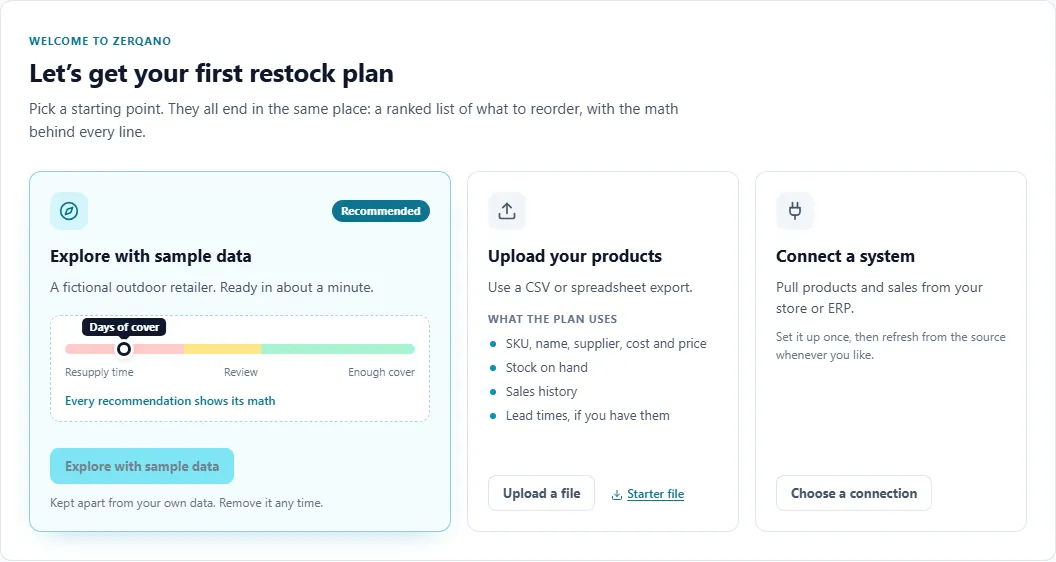
Bring your sales and stock
Upload a CSV or spreadsheet export, connect a system, or start with sample data.
Step 2
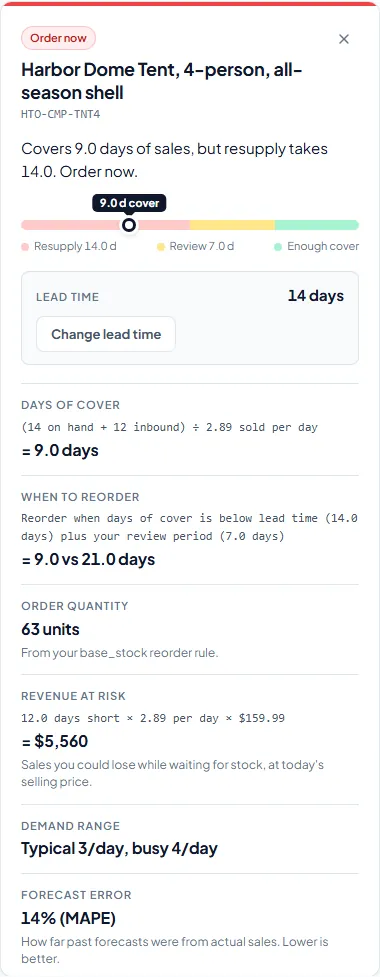
See what to reorder and why
Every SKU that will run out before a new order could arrive is ranked, with the math for each one.
Step 3
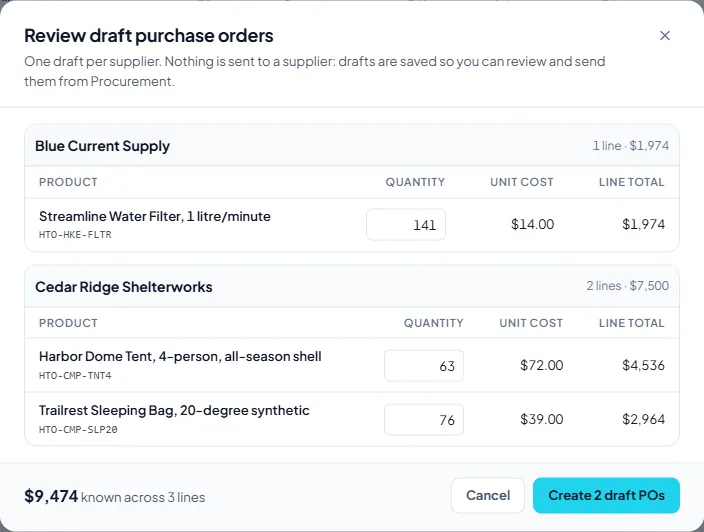
Draft purchase orders by supplier
Select the SKUs, check quantities and costs, and save one draft per supplier. Nothing is sent until you send it.
Estimate with your own numbers
What might stockouts be costing you?
Enter what you know about your business. The figure below is your own assumptions multiplied together, nothing more.
Your estimate
Example numbers. Change them to yours.
$150,000
a year lost to stockouts, from the numbers you entered
- Per month
- $12,500
- Per week
- $2,887
- If you won back 40% of it
- $60,000 a year
This is arithmetic on your inputs, not a forecast and not something Zerqano measured.
Try the Restock plan with sample dataSecurity and provenance
Your data stays yours. Every number shows its source.
- Where does my data go?
- Stored in Supabase Postgres, processed on Google Cloud Vertex AI, and encrypted in transit and at rest. Subprocessors are listed on the security page.
- Who can see it?
- Row-level security is on for every organization table, and the API checks your organization on every request. Roles decide who reviews and who approves.
- Can the AI make things up?
- Every figure comes with the math behind it, and a person approves every order. Google Cloud Vertex AI does not use your data to train its models.
Built for how buyers work
Start with the job in front of you.
- Restock planningSee which SKUs will run out before a new order could arrive.Learn more
- Purchase ordersDraft orders by supplier and follow them through to delivery.Learn more
- PricingReview price recommendations next to your costs.Learn more
- Supplier documentsRead invoices and confirmations into your workspace, then review what was extracted.Learn more
Next step
Start with your own catalog.
Bring a spreadsheet of products, stock and sales. You will see what needs reordering, and why, before you spend anything.
FAQ
Questions from retail operations teams.
What data do I need?
Products with current stock, recent sales by SKU, and supplier lead times. A spreadsheet export is enough.
Does Zerqano place orders on its own?
No. It drafts purchase orders; your team reviews and sends them.
Is there a free plan?
Yes. Free for up to 150 SKUs after a 14-day full trial.
How long until I see a restock plan?
Sample data is ready in about a minute. With your own files, you see the plan once your data is imported and the planning run finishes; larger catalogs take longer.