Request a demo
Show us the reorder that takes all morning.
Tell us which decision slows your team down. We build the walkthrough around it.
- Send the form. The page confirms it with a reference ID.
- We read your request and reply by email to set a time. There is no automatic reply.
- In the session we walk through that decision on real Zerqano screens.
- You decide whether a next step is worth it. No card, no commitment.
Talk to sales
Tell us about your catalog and systems.
A few details help us bring the right people and prepare for a security review if you need one.
What we show
The real product, not slides.
The Approvals page
Every proposal from the night, with its reason, waiting for Approve, Reject or Proof.
The Restock plan
What to order today and how much, against each supplier’s lead time.
Your own file, if you want
Bring a sales and stock export and we can walk through what Zerqano would read from it.
Where the session starts
One screen, every decision from the night.
Each proposal carries its reason. Nothing is sent until someone approves it.
Sample data · a fictional outdoor-gear store
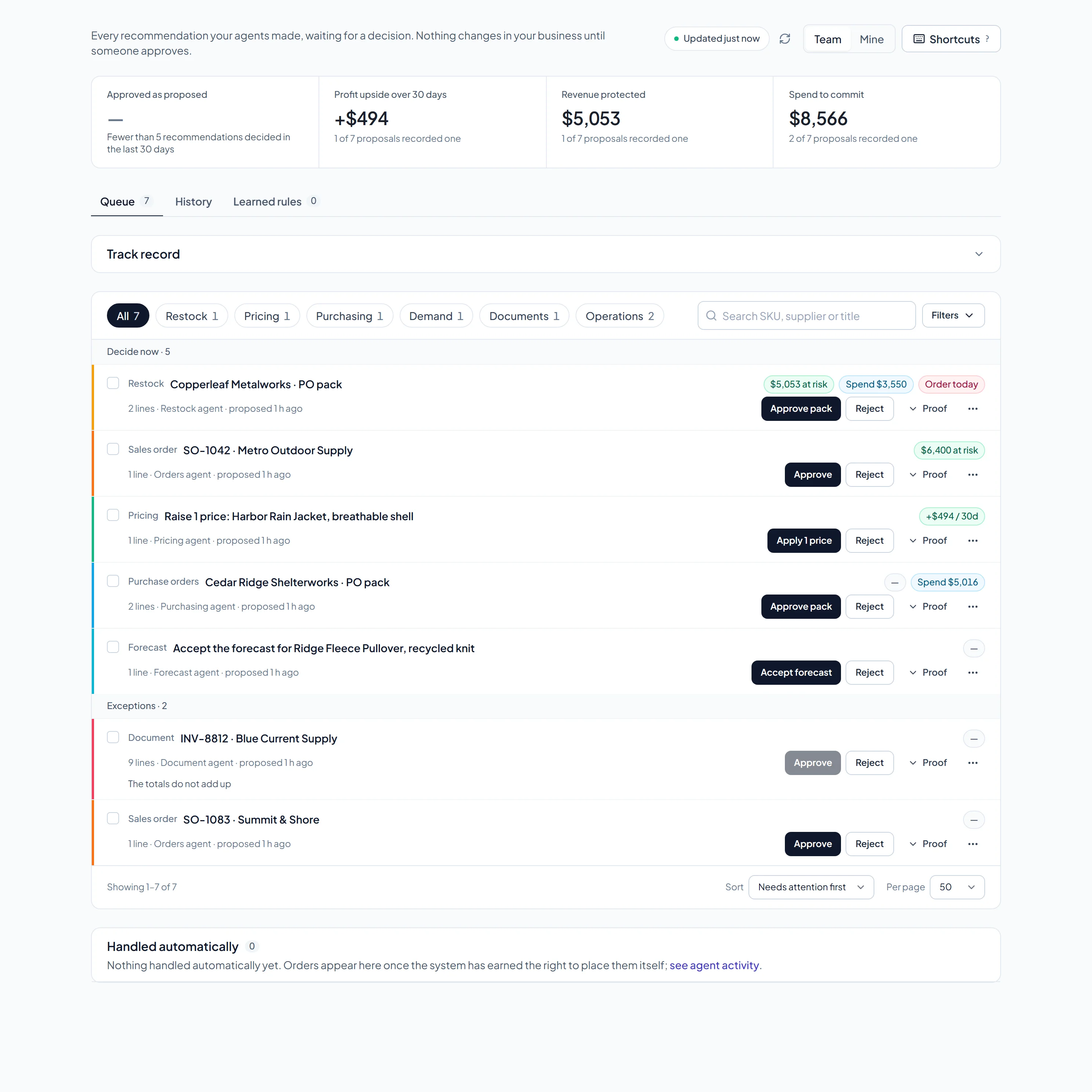
The Approvals page with the Harbor & Trail sample workspace. Sample data, not a customer’s results.
Before you book time.
What happens after I send the form?
Your request is saved for the team and the page confirms it with a reference ID. We read what you wrote and reply to schedule the walkthrough. There is no automatic email, so the reply comes from a person.
What if sending fails?
The form keeps everything you typed and shows what went wrong. When the request cannot be saved or sent, it offers to open the same request as an email to hello@zerqano.com.
What should I write in the request?
The decision that takes the most time today (for example the weekly reorder), the files or systems you use for it, and who approves the result. That is enough to shape the session.
Who should join?
The person who does the reordering, and the person who approves spend. If someone else owns the sales or stock export, bring them too.
Can a floor manager or store lead join, or is it only for head office?
Floor managers are often the most useful people in the session, because they know where the daily friction actually is.
Will you show my data or a sample?
By default we use Harbor & Trail Outfitters, a fictional outdoor-gear store with sample data. If you share a sales and stock export, we can walk through your own products instead.
Do I need to connect any systems first?
No. A first conversation needs nothing connected. When you start, a CSV or Excel export of sales and stock is enough.
Is the demo free, and do I need a card?
The demo is free. So is the free plan, for up to 150 SKUs, and the 14-day trial needs no card.
Can I see the product without a demo?
Yes. Open the sample plan, X-ray your own export without an account, or start free and load your own catalog.
Or start on your own.
Free for up to 150 SKUs · 14 days of full access · No card required